


Twiq - Anonymous Chat
3.6408.00 Reviews
App Specs
- Version
- 12.0.1
- Updated On
- License
- Free
- Downloads
- 500,000+
- Developer
- Voletius Ltd
- Categories
- Communication
- Platform
- Android
Screenshots
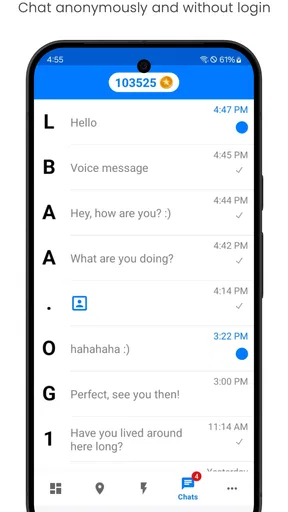
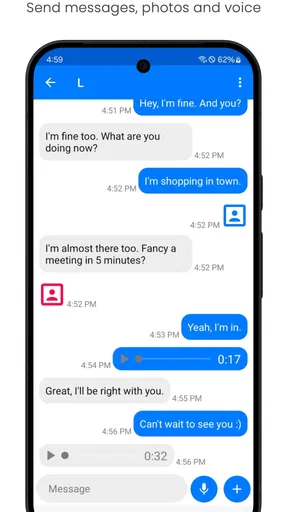
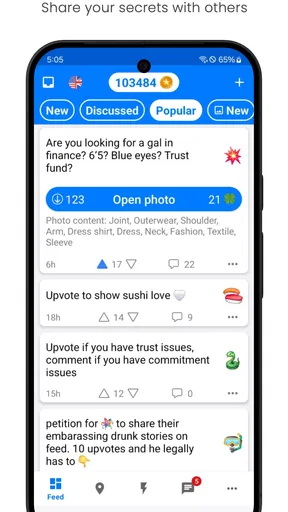
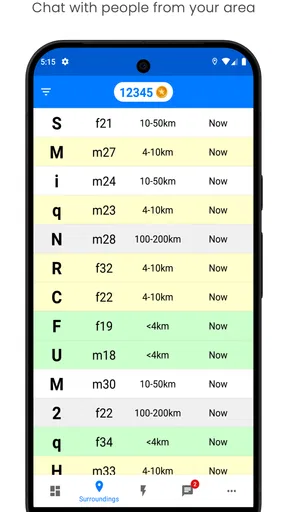
 Analysis by AppCompare
I approached Twiq - Anonymous Chat as a communication app for meeting people beyond my usual circle, not as a replacement for the messaging tools I already use with friends and family. Its central appeal is simple: it puts conversations with unfamiliar people at the front of the experience, with an emphasis on private chatting and worldwide connections. That can feel refreshing when I want a casual conversation without bringing my existing social network into it, but it also means trust and personal boundaries matter much more than they do in a normal contact app.
After spending time with it, my view is mixed but useful: Twiq can be enjoyable for open-ended conversations, especially when I am willing to accept that not every exchange will become meaningful. At the same time, the anonymous setting requires more attention from the user. I would not treat a new chat as automatically safe simply because the app presents itself as a place to meet friends. The best experience comes from using its social possibilities while keeping personal information, expectations, and spending under control.
What Twiq is really for
Twiq sits in the communication category, but it feels different from WhatsApp, Signal, Telegram, or a regular social network. Those services usually begin with people I already know, groups I choose, or public profiles connected to an established identity. Twiq instead makes the first step meeting someone new and starting a private conversation. That gives it a lighter, more spontaneous character, though it also removes some of the context I normally use to judge who I am talking to.
The developer is Voletius Ltd, and the app has been available since July 7, 2020. Its current version is 12.0.1 and it requires Android 9 or later. The app is free to install, while optional purchases range from $1.99 to $63.99 per item. I would keep that pricing detail in mind before becoming heavily invested in the service, because a free entry point can make it easy to explore first and think about spending later.
The audience is clearly mature. Twiq carries a Mature 17+ age rating, which is an important signal for parents and younger users: this is not an app I would recommend treating as a general-purpose chat space for children. The age label does not tell me that every conversation will be unsuitable, but it does tell me to approach the environment with adult judgement and to avoid assuming that an anonymous social app will provide the same protections or predictability as a family messaging tool.
Its reach is already substantial, with over 500 thousand installs, an average rating of 3.6 from around 6.8 thousand ratings, and 408 written reviews. Those figures suggest a real user base without making Twiq look universally loved. I read that middle position as a fair warning: enough people find value in it to keep using it, but the experience is likely to depend strongly on the kind of conversations a person seeks and how carefully they manage interactions.
Starting conversations without overcommitting
The strongest use case is a short, low-pressure exchange. If I am bored, curious about people in other places, or interested in a conversation that does not begin with my existing identity, Twiq offers a more direct route than joining a large public forum. I can approach it with a simple goal, such as having a few friendly conversations during a commute or finding someone who shares a niche interest.
Worth Reading Before You Choose

Flipboard Shows What News Apps Must Do Beyond the Feed

Switching to Android Auto Means Rethinking Your Driving Routine

Google Calendar Makes a Crowded Week Easier to Manage

Ludo King Makes the Most of the Minutes Between Plans

Baby Panda World Brings Quick Play to Modern Phones, but Its Game Library Feels Busy

ESPN’s Live Game View Makes Following Close Games Easier
That flexibility is also the first trade-off. On a conventional messaging app, a contact usually arrives through a known person, an invitation, or a community with visible rules. Here, the unknown element is part of the attraction. I have to be comfortable ending chats that feel awkward, repetitive, pushy, or too personal. The app is better suited to people who can set boundaries quickly than to users who feel responsible for keeping every conversation alive.
A realistic everyday scenario would be using Twiq during an evening when I want conversation but do not want to post publicly. I might begin with a harmless topic, keep the first exchange general, and see whether the other person respects the tone. If the conversation becomes interesting, I can continue. If it turns toward requests for photos, money, contact details, or urgent help, I would stop rather than trying to rescue the interaction. That workflow is more important here than any single discovery feature.
Trust starts with the controls I can actually use
When I assess an anonymous chat app, I look for visible choices before I worry about its social promise. I want to know what I can control during a conversation, how easily I can leave, and whether I can avoid turning a casual chat into a lasting connection. Twiq should be approached through that practical lens. The safest habit is to use only the controls that are clearly presented in the app, rather than assuming that anonymity automatically protects me.
I would also examine the account and conversation screens before starting serious chats. If there is a profile setting, privacy choice, reporting route, blocking option, or way to remove a conversation, I would learn where it is while the app still feels calm. Searching for those controls only after a problem begins is stressful and can lead to rushed decisions. A few minutes of preparation makes it easier to leave an uncomfortable exchange without negotiation.
One useful technique is to keep the first message deliberately narrow. Instead of sharing my workplace, neighborhood, full name, schedule, or other identifying details, I would ask an open but impersonal question about hobbies, films, travel, music, or daily routines. This lets me test whether someone can hold a normal conversation. A person who immediately pushes for private details has already given me a reason to reduce contact.
I would not confuse a private chat with a verified identity. Private describes the conversation format; it does not prove that the person on the other side is who they claim to be. That distinction is easy to forget when a chat feels warm or unusually personal. I would keep the same caution I use with any stranger online, even when the exchange seems friendly and the app makes meeting people feel effortless.
Where the mature rating changes the decision
The Mature 17+ rating affects more than age suitability. It changes how I would recommend Twiq to someone who is sensitive to sexual content, aggressive messages, manipulation, or emotionally intense conversations. A user may be looking only for friendship and still encounter people with very different intentions. I would not install it on a shared family device for a younger person, and I would not present it as a supervised alternative to a child-safe chat service.
For an adult, the rating is a reminder to decide in advance what topics are off-limits. I find it easier to leave when I have already made that decision. I would also avoid moving quickly to another platform just because a stranger suggests it. A request to continue elsewhere can be harmless, but it can also remove whatever in-app context or controls are available. Keeping the conversation inside Twiq until trust develops is the more cautious choice.
Data-sensitive moments deserve extra attention
The most data-sensitive moment is not necessarily installation; it is the point where a stranger starts asking questions that seem ordinary but can be combined into a profile. A first name, city, job, school, time zone, and daily routine may each feel harmless. Together, they can reveal far more than intended. I would answer broadly, delay personal details, and avoid sending anything that could identify my home, workplace, or regular movements.
Photos deserve the same care. Before sharing one, I would check whether it shows a badge, street sign, house number, school uniform, car plate, or recognizable view from home. I would also avoid sending intimate images to a person whose identity I cannot verify. Once an image leaves my control, deleting a conversation may not undo the consequences. That is a general online safety rule, but anonymous chat makes it especially relevant.
I would treat requests for money, gift cards, account access, verification codes, or emergency assistance as a firm stopping point. The emotional story may sound convincing, but Twiq is not a place where I can reliably verify a stranger’s claims. I would not click unfamiliar files or follow suspicious instructions merely because the conversation has become friendly. The quickest way to protect the account and my personal life is to refuse, block, and report when the available controls support those actions.
Notifications can create another privacy issue in everyday use. If messages appear on a lock screen or a shared device, someone nearby may see more than I intended. I would review the phone’s notification settings and consider hiding message previews if privacy matters. This is a small adjustment, but it prevents a private conversation from becoming visible in a public place, at work, or around family members.
Spending needs a deliberate boundary
Because Twiq is free to install but includes purchases from $1.99 to $63.99 per item, I would decide beforehand whether I want to spend anything at all. I would not buy an item simply to keep a conversation going or to respond to pressure from another user. If a chat becomes dependent on spending, that is a sign for me to step back and reassess whether the interaction is providing genuine value.
I would also use the device’s purchase protections, especially if more than one person can access the phone. A free communication app can become unexpectedly expensive when individual purchases are made impulsively. The safest approach is to explore the normal experience first, understand what is available without payment, and only consider a purchase when I can explain exactly what it changes for me.
This is one area where Twiq differs from Signal or a basic SMS app. Those tools focus on communicating with known contacts and do not place the same emphasis on discovering strangers through a social environment. Twiq may offer more spontaneity, but that comes with more uncertainty and a greater need to watch both conversations and purchase prompts. If my priority is dependable private messaging with people I already trust, a conventional messenger is the better fit.
Who will enjoy it, and who should skip it
I can recommend Twiq to an adult who likes meeting unfamiliar people, understands that conversations may be uneven, and is comfortable leaving quickly when the tone changes. It is a reasonable choice for someone who wants casual international interaction without building a public profile on a large social network. It may also suit a person who enjoys trying different conversations rather than expecting every match to become a lasting friendship.
I would skip it if I want verified contacts, professional networking, family communication, or a dependable record of people I already know. I would also avoid recommending it to anyone who finds anonymous messages emotionally draining or who tends to share personal information when trying to be polite. The app’s appeal depends on uncertainty, so users who need strong identity context will probably feel more comfortable on a service built around established contacts or moderated communities.
It is not the right tool for urgent support, medical advice, financial guidance, or crisis conversations. A stranger may be kind, but that does not make them qualified or accountable. For serious problems, I would use an appropriate professional or local support service instead of relying on an anonymous chat. Twiq works best as a social outlet, not as a substitute for trusted relationships or expert help.
Small habits that improve the experience
My first recommendation is to set a time limit for browsing and chatting. Discovery-based apps can make it easy to keep checking for a more interesting conversation, even when the current session has stopped being enjoyable. A short session with a clear purpose helps me judge the app on the quality of interaction rather than on how long it can hold my attention.
Second, I would keep separate boundaries for conversation and connection. A pleasant chat does not require immediate access to my other social accounts. I can enjoy the exchange inside Twiq while waiting to see whether the other person remains respectful over time. If someone reacts badly to a reasonable boundary, that reaction is useful information and a strong reason not to continue.
Third, I would periodically review the account and privacy choices I can see. Apps change, interfaces move, and habits become automatic. Checking those options after an update or before becoming more active helps me notice whether I am comfortable with the way I use the service. I would pay particular attention to profile visibility, notification previews, purchase settings, and any available tools for ending unwanted contact.
Finally, I would keep expectations realistic. A worldwide pool of strangers sounds exciting, but it does not guarantee deep friendship. Some chats will be brief, some will be dull, and some may be uncomfortable. I get more from Twiq when I treat each conversation as optional rather than as a promise of connection. That mindset protects my time and makes it easier to appreciate the good exchanges.
My cautious verdict
Twiq has a clear identity: it is a free communication app for adults who want to start private conversations with people they do not already know. I like the low-pressure possibility of meeting someone outside my normal social circle, and I can see why the format appeals to curious, talkative users. The app is more interesting when I use it intentionally, with a topic in mind and a firm limit on what I am willing to reveal.
My reservations are equally clear. Anonymous interaction removes useful context, the mature audience changes the safety expectations, and optional purchases mean I would keep spending under close control. The average rating of 3.6 reflects a service that is neither an obvious failure nor a universal recommendation. For me, that makes the right conclusion conditional rather than enthusiastic.
Twiq is worth trying if you want casual conversations with strangers and are confident about your boundaries. I would install it as an experiment, inspect the visible account and conversation controls, adjust notifications, and avoid sharing identifying details during the early chats. If I wanted secure communication with people I already trust, I would choose a more conventional messenger. If I wanted anonymous discovery but could not tolerate unpredictable interactions, I would skip Twiq altogether.
In short, the app can provide genuine social moments, but the user has to supply much of the caution. Its best feature is the chance to begin a conversation that would never happen in my normal contacts list; its biggest weakness is that I must do more work to decide which conversations deserve my time and trust. Used with that balance, Twiq is a plausible social experiment rather than something I would make the center of my communication life.
Pros
- Anonymous conversations make it easier to share thoughts openly.
- Simple interface helps users start chatting without a long setup.
- Useful for meeting people outside your existing social circle.
- Quick chat format suits short
- casual conversations.
- Profiles can feel less exposed than on traditional social networks.
Cons
- Anonymity can encourage rude
- offensive
- or inappropriate messages.
- You may encounter inactive users or conversations that end abruptly.
- Limited identity details make it difficult to judge who is trustworthy.
- Privacy risks remain if you share personal information in chats.
- Some interactions may feel repetitive due to anonymous matching.
FAQs for Twiq - Anonymous Chat
What is Twiq - Anonymous Chat, and how does it work?
Twiq - Anonymous Chat is designed for meeting and messaging people without immediately revealing your real identity. After creating a profile, you can browse conversations or connect with other users based on the app’s available discovery features. The anonymous format can make starting conversations easier, but users should still avoid sharing sensitive information until they trust the person they are speaking with.
Is Twiq - Anonymous Chat completely anonymous?
The app focuses on anonymous or privacy-oriented communication, but users should not assume that activity is invisible or untraceable. Account details, device information, messages, and usage data may be processed according to the developer’s privacy policy. Avoid using your full name, address, workplace, financial details, passwords, or private photographs, and review the permissions and privacy terms before creating an account.
Is Twiq - Anonymous Chat safe for teenagers and younger users?
Safety depends on the app’s current age rating, moderation tools, and the behavior of other users. Anonymous chat services can expose people to unwanted messages, inappropriate content, scams, or attempts to move conversations elsewhere. Parents and younger users should check the official age requirement, use blocking and reporting tools, and never arrange an in-person meeting without trusted adult involvement and proper safety precautions.
Can I block or report someone on Twiq - Anonymous Chat?
A useful anonymous chat service should provide ways to block users, report harassment, and manage unwanted contact. Before using Twiq regularly, check where these controls are located and whether reports can include message or profile details. If someone requests money, pressures you for personal information, sends abusive content, or encourages unsafe behavior, end the conversation, block the account, and report it promptly.
Does Twiq - Anonymous Chat cost money, and what should I check before downloading it?
The app may be free to download while offering optional purchases, subscriptions, or paid features, depending on the current version and your platform. Check the Google Play Store or App Store listing for pricing, in-app purchases, age rating, developer information, and recent reviews. Also confirm that your device meets the requirements and read the privacy policy before granting access to personal data or notifications.


